
JamesB
-
Posts
1,053 -
Joined
Content Type
Forums
Donations
News
Events
Gallery
Everything posted by JamesB
-
I’m always surprised by how many people who are sexually active on the apps or hiring aren’t taking PrEP, let alone Doxy. It really boggles my mind.
-

Question for clients: using a second phone?
+ JamesB replied to Redbook's topic in Questions About Hiring
I always use a burner number for the initial contact. If they become a regular, then I’ll share my real number. I don’t see a reason to give my personal number to every provider I try once or twice. For the same reason, I don’t host at my place the first time. It’s either an incall or a hotel. -
Definition of versatile/ bottom or versatile/top?
+ JamesB replied to Veryshyone's topic in Questions About Hiring
Like I said, my experience has been different. At least in my area, most providers advertise as Top or Vers/Top. While I consider myself Vers, when I hire it’s usually because I want to Top, so I often end up topping guys who advertise themselves as Vers/Top. Contrary to what some members here (looking at you pubic_assistance LOL!) seem to assume, not everyone who hires fits the stereotype of a fat, sweaty, bald old man. That said, I’m not “hot as hell” either. There’s a guy I used to see occasionally who was originally a total Bottom and advertised himself that way. Over time, he changed his profile to Vers and eventually to Vers/Top. When I asked him about it, his explanation was simple: most of the clients in the area are Bottoms, and if he wanted to work consistently, he had to Top. -
https://www.masseurfinder.com/massage-therapists/52272/ I know the profile is new based on the number, but the way the ad is written makes me think this isn’t his first rodeo. His phone number is from the West Coast, LA County area, likely Santa Monica.
-
Definition of versatile/ bottom or versatile/top?
+ JamesB replied to Veryshyone's topic in Questions About Hiring
My experience has been quite different, so I’m not sure that really holds. -
Would like feedback on disappointing experience ...
+ JamesB replied to steve10025's topic in The Deli
I’ve had disappointing experiences with several Venezuelan providers as well, to the point that when I know someone is from Venezuela I usually don’t reach out anymore. I’ve sometimes wondered if that might be an overreaction on my part or a cultural thing, but hearing that you, as a Venezuelan, have had similar experiences makes me feel a bit more comfortable with the conclusion I came to based on my own experience. -
Since the last update a few months ago, the last login date and time shown on RMasseur profiles has become essentially useless.
-
Actually, I don’t think that’s correct. It seems more like a confusion between a well-documented economic phenomenon known as “rockets and feathers” and a conspiracy theory about some hidden oil executive calendar. But to each their own.
-
This is quite an interesting second post, especially considering your first one was a negative review of a masseur. https://www.companyofmen.org/topic/162664-stonefruitnyc/#findComment-2588734
- 24 replies
-
- 13
-

-

-

-

-

-
Could you share the source for this claim?
-
New providers every time — or finding a few regulars?
+ JamesB replied to Tajoki's topic in Questions About Hiring
My ideal situation is to have 3 regulars, along with a mix of familiar and new visitors. That said, at least for me, finding a new regular lately has been quite difficult. I’m currently down to 1.5 regulars and I haven’t been able to fill the open spots. And no, I didn’t actually cut a provider in half. He simply started his own business and although he still sees me, getting our schedules to match has turned out to be no easy task, so I count him as half. -
*Yet another warning about deposits
+ JamesB replied to Austin Lewis's topic in Questions About Hiring
https://www.companyofmen.org/topic/151324-steps-on-how-to-block-a-member-of-this-site-from-your-feed/#comment-2284845 -
If your goal is simply to fix an image like in your example, almost any AI tool can handle that for you, so there’s no real need to learn Photoshop or similar software. You might want to try Gemini with Nano Banana or Grok’s Imagine feature.
- 1 reply
-
- 2
-
-
You could take one for the team.
-
How much personal real-life information do you share?
+ JamesB replied to Wings246's topic in Questions About Hiring
Information once shared cannot be unshared. Shared information cannot be retrieved, only regretted. Choose wisely.- 39 replies
-
- 11
-
-
-
He’s back in Orlando, still no reviews. Has anyone had an experience with him?
-
Let’s just say if the day has a “D” in it, I’m in the mood for hiring.
-
Name change https://rent.men/Massagebybilly
-
Name change, now back to: https://rent.men/PuertoRicanBilly
-
I’m only counting the ones that offer some entertainment value. For instance, on this one, the OP marks one of his own posts as the solution to his own thread. LOL!
-

-
Name change: https://rent.men/NudeMassbyBilly
-
Here are some things you may want to try: 1. Clear the Print Spooler. Sometimes a "ghost" document gets stuck in the brain of the computer's print service, blocking everything behind it. Press Windows Key + R, type services.msc, and hit Enter. Find Print Spooler in the list. Right-click it and select Stop. Open File Explorer and go to: C:\Windows\System32\spool\PRINTERS Delete everything in that folder (don't worry, these are just temporary stuck files). Go back to the Services window, right-click Print Spooler, and select Start. 2. Check the Port Settings Because this is an older model, Windows sometimes defaults to the wrong "virtual" port during setup. Go to Settings > Devices > Printers & Scanners. Click your HP P2035 and select Manage, then Printer Properties. Click the Ports tab. Ensure a USB or DOT4 port is checked. If it’s set to "LPT1" or a "WSD" port, it likely won't communicate with a physical USB cable. 3. The "Class Driver" vs. "Full Driver" Since you did a driver update, you might have the "HP Smart" or "Universal" driver, which can be finicky. Try the HP Universal Print Driver (PCL6). It is often more stable than the model-specific installer. Alternatively, try the Windows Update driver: Unplug the USB, go to Printers & Scanners, "Remove Device," then plug the USB back in and let Windows find its own driver without the HP installer software. 4. Direct Connection Check. Avoid Hubs. If the printer is plugged into a USB hub or a monitor's USB port, plug it directly into the back of the PC. These older LaserJets are sensitive to voltage drops in hubs. Try a USB 2.0 Port: If your computer has both blue (USB 3.0) and black (USB 2.0) ports, try the black one. Older hardware sometimes struggles with the high-speed 3.0 handshake. 5. Quick Hardware Test To prove the printer itself is 100% fine and it’s definitely a Windows issue. With the printer on and ready (Green light), press and hold the Green/Go button for about 5 seconds until the ready light blinks, then release. If a Self-Test/Configuration page prints, the printer hardware is perfect. If it doesn't, we might be looking at a physical paper feed or internal sensor issue.
-
Please DO NOT EVER book this individual...HELL ME FIND HO.
+ JamesB replied to fjntimes001's topic in The Deli
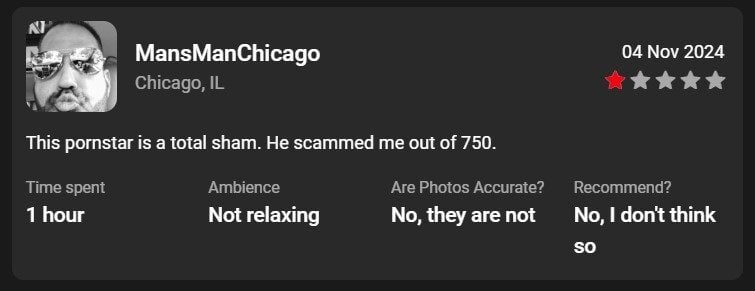
One of his reviews:
-
Name change: https://rent.men/PuertoricanBilly